

Retrieval-Augmented Generation (RAG) has become the gold standard architecture for extending the capabilities of Large Language Models (LLMs) with enterprise domain knowledge. By combining the natural language understanding of LLMs with real-time retrieval from dynamic data stores, RAG eliminates hallucinations, enhances accuracy, and avoids the costly alternative of fine-tuning models on private data.
With the emergence of Spring AI, Java developers now have a native, production-grade framework to build RAG pipelines seamlessly within the familiar Spring ecosystem.
1. Why Spring AI for RAG?
Historically, the AI development landscape was dominated by Python tools such as LangChain and LlamaIndex. Spring AI bridges this gap for enterprise Java applications by introducing portable abstractions across:
- AI Models: Unified interfaces for OpenAI, Anthropic, Ollama, Bedrock, Azure OpenAI, and Hugging Face.
- Vector Stores: Standardized CRUD and similarity search across PgVector, Neo4j, Pinecone, Qdrant, Milvus, Redis, Chroma, and Weaviate.
- ETL Data Pipelines: Native interfaces for document loading (
DocumentReader), chunking/transformation (DocumentTransformer), and vector indexing (VectorStore). - Advisors: Modular interceptor chains (
QuestionAnswerAdvisor,RetrievalAugmentationAdvisor) that automatically inject retrieved context into chat interactions.
2. Key Use Cases for RAG in Enterprise Applications
| Use Case | Description | Primary Data Source |
| Enterprise Knowledge Bases | HR policies, technical documentation, internal wikis, and customer support manuals. | PDF, Confluence, Markdown, HTML |
| Customer Support Automation | Intelligent chatbots providing factual product answers with exact citations. | Product docs, FAQs, order logs |
| Legal & Compliance Auditing | Analyzing contracts, compliance policies, and regulatory documents for risk analysis. | Structured & unstructured legal text |
| Financial Analysis & Reporting | Answering questions over quarterly reports, SEC filings, and earning call transcripts. | PDF tables, financial filings |
| Root Cause & Log Analysis | Querying system logs, incident reports, and architecture diagrams during outages. | Telemetry logs, Incident reports |
3. Core Architecture of RAG in Spring AI
A complete Spring AI RAG pipeline consists of two primary phases: Ingestion (ETL) and Retrieval & Generation.
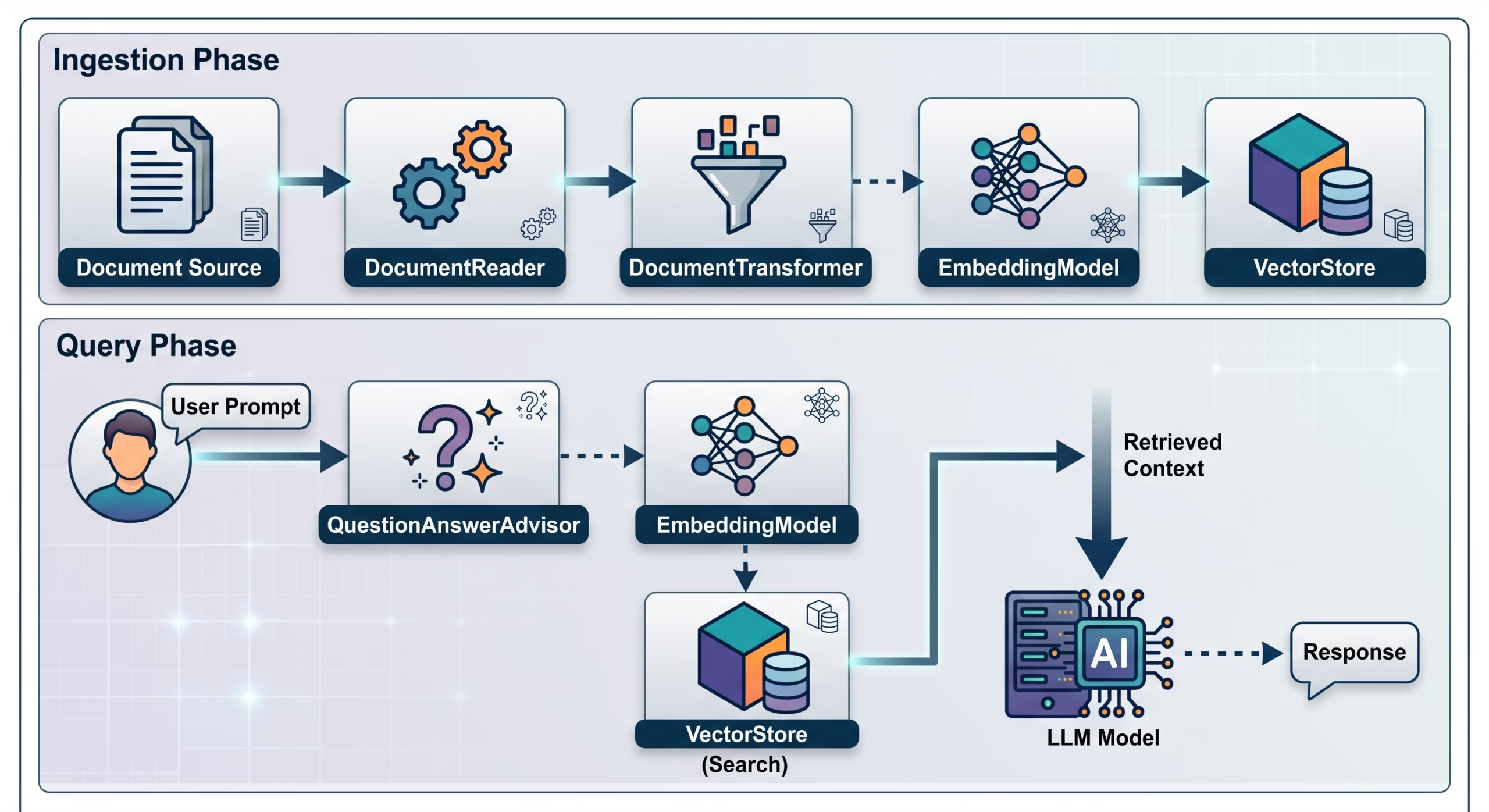
Key Interfaces:
DocumentReader: Ingests raw data from sources (e.g.,PagePdfDocumentReader,TikaDocumentReader).DocumentTransformer: Splits long text into manageable token chunks using strategies likeTokenTextSplitter.EmbeddingModel: Converts text chunks into numerical vectors (embeddings).VectorStore: Stores vector embeddings along with text chunks and metadata.ChatClient: Executes model interactions wrapped with RAG advisors.
4. Vector DB vs. Graph DB (GraphRAG) Approaches
Depending on the nature of your enterprise data, you can implement RAG using Vector Databases, Graph Databases, or a Hybrid Approach.

Option A: Vector Database Approach (Standard RAG)
Vector RAG measures semantic similarity between the user query vector and document vector embeddings using distance metrics like Cosine Similarity or Euclidean Distance.
How It Works:
- Embed text chunks into high-dimensional vectors.
- Embed the incoming user query.
- Retrieve the Top-$K$ nearest neighbor chunks.
- Inject retrieved text into the LLM system prompt.
Pros & Cons:
- Pros: Easy to set up, highly performant on unstructured text, scales well with standard embeddings.
- Cons: Struggles with complex multi-step reasoning, hierarchical logic, or understanding relationships across distant documents.
Sample Spring AI Implementation (Vector Store):
@Service
public class VectorRagService {

    private final ChatClient chatClient;
    private final VectorStore vectorStore;

    public VectorRagService(ChatClient.Builder chatClientBuilder, VectorStore vectorStore) {
        this.vectorStore = vectorStore;
        this.chatClient = chatClientBuilder
                .defaultAdvisors(new QuestionAnswerAdvisor(vectorStore, SearchRequest.defaults().withTopK(4)))
                .build();
    }

    public String askQuestion(String question) {
        return chatClient.prompt()
                .user(question)
                .call()
                .content();
    }
}
Option B: Graph Database Approach (GraphRAG / Knowledge Graphs)
GraphRAG builds an explicit Knowledge Graph where entities (Nodes) and relationships (Edges) are extracted from documents. Retrieval is performed using graph queries (e.g., Cypher) or graph traversals rather than purely vector distance.
How It Works:
- Entity & Relation Extraction: Use an LLM or Named Entity Recognition (NER) pipeline to parse text into
(Entity A) - [RELATION] -> (Entity B)triples. - Graph Ingestion: Store nodes and relationships in a graph database like Neo4j or Memgraph.
- Graph Retrieval: Convert user questions into Cypher queries or extract localized subgraphs to supply structured relational context to the LLM.
Pros & Cons:
- Pros: Superior at multi-hop reasoning (e.g., “Which vendor supplies parts for products impacted by Directive X?”), transparent provenance, zero semantic drift across linked entities.
- Cons: Higher ingestion costs (LLM-heavy extraction step), complex graph schema management.
Spring AI & Neo4j Integration Example:
Spring AI provides dedicated support for Neo4j Vector Stores, which combine graph traversal with vector indexes.
@Configuration
public class GraphRagConfig {

    @Bean
    public VectorStore neo4jVectorStore(Driver driver, EmbeddingModel embeddingModel) {
        Neo4jVectorStoreConfig config = Neo4jVectorStoreConfig.builder()
                .withDatabaseName("neo4j")
                .withIndexName("custom-rag-index")
                .build();

        return new Neo4jVectorStore(driver, embeddingModel, config, true);
    }
}
For advanced GraphRAG, custom Spring services can execute Cypher queries to extract explicit subgraphs before prompting:
@Service
public class GraphRagService {

    private final Neo4jClient neo4jClient;
    private final ChatClient chatClient;

    public GraphRagService(Neo4jClient neo4jClient, ChatClient.Builder chatClientBuilder) {
        this.neo4jClient = neo4jClient;
        this.chatClient = chatClientBuilder.build();
    }

    public String queryGraphAndGenerate(String entityName, String userQuestion) {
        // 1. Fetch connected relationships from Knowledge Graph
        var graphContext = neo4jClient.query("""
                MATCH (e:Entity {name: $name})-[r]->(related)
                RETURN e.name + ' ' + type(r) + ' ' + related.name AS fact
                """)
                .bind(entityName).andWith(userQuestion)
                .fetch().all();

        String context = graphContext.stream()
                .map(row -> row.get("fact").toString())
                .collect(Collectors.joining("\n"));

        // 2. Prompt LLM with explicit structured context
        return chatClient.prompt()
                .system("Use the following relational facts to answer the question:\n" + context)
                .user(userQuestion)
                .call()
                .content();
    }
}
Option C: Hybrid Approach (Vector + Knowledge Graph)
The most resilient enterprise architecture combines both models:
- Vector Search: Quickly finds relevant unstructured text blocks and candidate entity IDs.
- Graph Traversal: Expands context around candidate entities to fetch structural relationships.
- Reranking: Merges vector search results and graph properties, passes top candidates to the LLM.
5. Building an End-to-End RAG Ingestion Pipeline in Spring AI
Below is a complete enterprise ingestion pipeline using Spring Boot and Spring AI.
Maven Dependencies (pom.xml excerpt):
<dependencies>
    <!-- Spring AI Starter -->
    <dependency>
        <groupId>org.springframework.ai</groupId>
        <artifactId>spring-ai-openai-spring-boot-starter</artifactId>
    </dependency>
    <!-- PgVector Store -->
    <dependency>
        <groupId>org.springframework.ai</groupId>
        <artifactId>spring-ai-pgvector-store-spring-boot-starter</artifactId>
    </dependency>
    <!-- Document Reader (PDF) -->
    <dependency>
        <groupId>org.springframework.ai</groupId>
        <artifactId>spring-ai-pdf-document-reader</artifactId>
    </dependency>
</dependencies>
Ingestion Service Implementation:
@Service
public class DocumentIngestionService {

    private final VectorStore vectorStore;

    public DocumentIngestionService(VectorStore vectorStore) {
        this.vectorStore = vectorStore;
    }

    public void ingestPdfResource(Resource pdfResource) {
        // 1. Read document
        PagePdfDocumentReader pdfReader = new PagePdfDocumentReader(
                pdfResource,
                PdfDocumentReaderConfig.builder()
                        .withPageTopMargin(0)
                        .withPageExtractedTextFormatter(new PdfDateCleaner())
                        .build()
        );
        List<Document> rawDocuments = pdfReader.get();

        // 2. Transform / Chunk Text
        TokenTextSplitter textSplitter = new TokenTextSplitter(
                800, // Chunk size in tokens
                350, // Minimum chunk size
                5,   // Min chunk length chars
                100, // Token overlap
                true // Keep separators
        );
        List<Document> chunkedDocuments = textSplitter.apply(rawDocuments);

        // 3. Vectorize and Write to Vector Database
        vectorStore.accept(chunkedDocuments);
    }
}
6. Advanced Production Strategies for Spring AI RAG
- Chunking Strategy Tuning:
- Adjust chunk sizes based on model context windows. Standard general-purpose settings:
500 - 1000tokens with10-15%overlap.
- Adjust chunk sizes based on model context windows. Standard general-purpose settings:
- Metadata Filtering:
- Use metadata tagging (
department,tenant_id,creation_date) to apply precise vector search pre-filtering:Filter.Expression expression = new FilterExpressionBuilder() .eq("department", "HR") .and(new FilterExpressionBuilder().eq("access_level", "PUBLIC")) .build(); SearchRequest searchRequest = SearchRequest.defaults() .withQuery("maternity leave policy") .withFilterExpression(expression);
- Use metadata tagging (
- Hybrid Search (Sparse + Dense):
- Combine lexical keyword search (BM25) with dense vector search to catch precise alphanumeric terms like product SKUs or error codes.
- Re-ranking:
- Retrieve a larger candidate pool (e.g., $K=20$) and pass results through a Cross-Encoder / Re-ranker model (e.g., Cohere Rerank) to yield the top $K=4$ most relevant chunks before prompting the LLM.
7. Conclusion & Summary Comparison
- Use Vector Stores for standard unstructured document Q&A, fast implementation cycles, and general semantic search.
- Use Graph Databases (GraphRAG) when your domain requires reasoning over complex entities, explicit relationships, compliance hierarchies, or supply chain linkages.
- Leverage Spring AI abstractions to keep your enterprise application flexible, allowing effortless switching or combining of vector stores and LLM providers.
Share this:

Discover more from GhostProgrammer - Jeff Miller
Subscribe to get the latest posts sent to your email.