
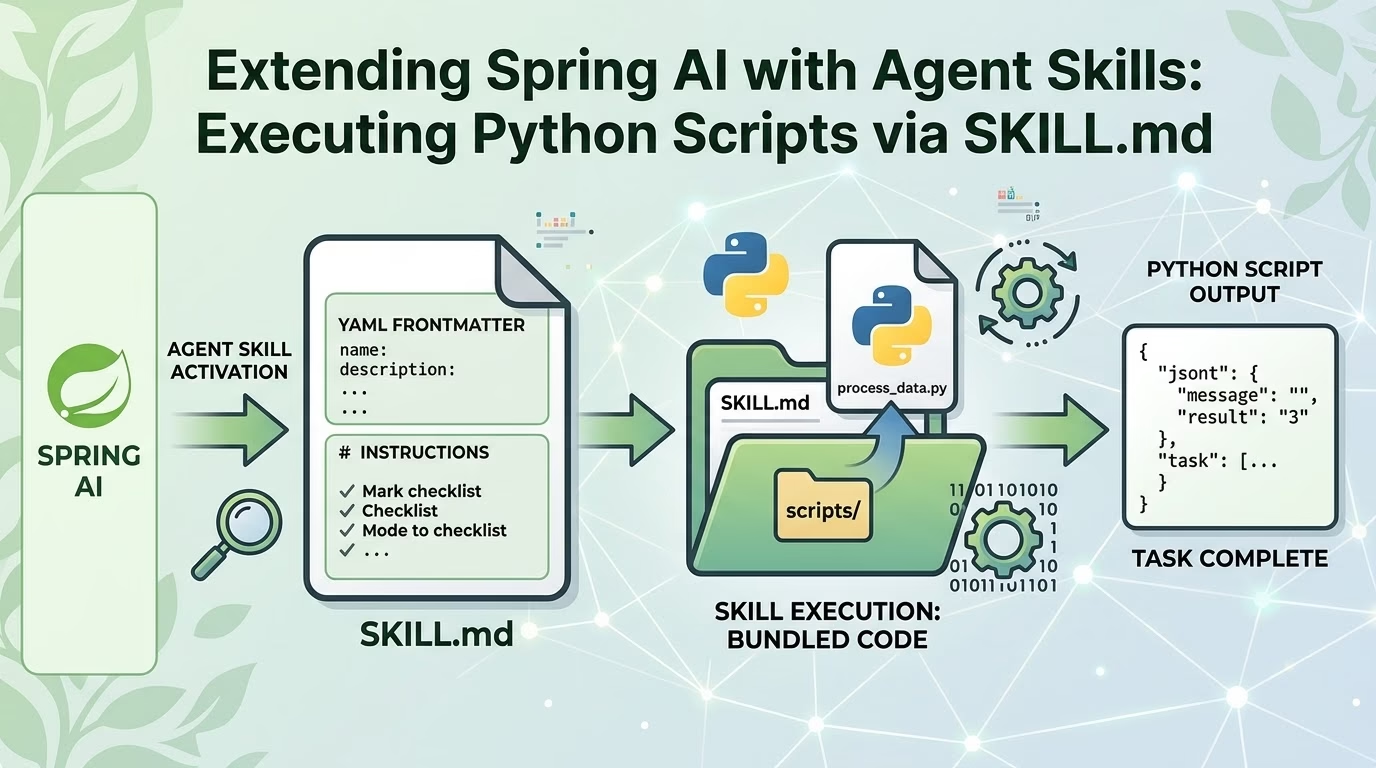
As AI agents evolve from simple chat interfaces to autonomous problem-solving systems, managing prompt bloat and custom tool integrations becomes a critical architectural challenge. If you embed every instruction, workflow, and script binding directly into system prompts, your model context windows quickly saturate, token costs soar, and agent behavior becomes erratic.
Enter Agent Skills—an open standard (originally released by Anthropic and maintained at agentskills.io) designed to package specialized capabilities into self-contained, version-controlled directories.
In this article, we’ll explore how to leverage the SKILL.md manifest inside a Spring AI application, configure local LLMs using Ollama, and empower your agent to dynamically discover, activate, and execute Python scripts stored inside skill directories.
1. What is an Agent Skill and SKILL.md?
An Agent Skill is a standardized folder layout containing instructions, references, and executable code. At the heart of every skill is a SKILL.md manifest file.
Key Concepts & Progressive Disclosure
Instead of dumping every instruction into the agent’s context window on every request, Agent Skills utilize progressive disclosure:
- Discovery (Low Context): At startup, the agent reads only the YAML frontmatter (
nameanddescription) of all available skills. This provides awareness with minimal token overhead. - Activation (On-Demand Context): When a user’s task matches a skill’s description, the agent reads the full markdown body of
SKILL.mdinto the prompt context. - Execution (Tool Calling): The agent follows step-by-step instructions in
SKILL.mdto trigger local tools or scripts (e.g., Python scripts located inscripts/).
my-python-skill/
├── SKILL.md               # Manifest: Metadata + Agent Instructions
├── scripts/
│   └── analyze_data.py    # Executable Python script
├── references/            # Optional: Extra docs or schemas
└── assets/                # Optional: Output templates
2. Project Setup: Spring Boot, Spring AI, and Gradle
Let’s set up a modern Spring Boot project using Gradle and Spring AI with Ollama as the local model provider.
Gradle Configuration (build.gradle.kts)
plugins {
    java
    id("org.springframework.boot") version "3.3.2"
    id("io.spring.dependency-management") version "1.1.6"
}

group = "com.example.ai"
version = "0.0.1-SNAPSHOT"

java {
    toolchain {
        languageVersion.set(JavaLanguageVersion.of(21))
    }
}

repositories {
    mavenCentral()
    maven { url = uri("[https://repo.spring.io/milestone](https://repo.spring.io/milestone)") }
}

ext {
    set("springAiVersion", "1.0.0-M1")
}

dependencies {
    implementation("org.springframework.boot:spring-boot-starter-web")
    implementation("org.springframework.ai:spring-ai-ollama-spring-boot-starter")

    // JSON processing for tool argument parsing
    implementation("com.fasterxml.jackson.module:jackson-module-kotlin")

    testImplementation("org.springframework.boot:spring-boot-starter-test")
}

dependencyManagement {
    imports {
        mavenBom("org.springframework.ai:spring-ai-bom:${property("springAiVersion")}")
    }
}
Application Configuration (application.yml)
Configure your Spring AI connection to local Ollama instance running a tool-capable model like qwen2.5 or llama3.1.
spring:
  application:
    name: spring-ai-skills-demo
  ai:
    ollama:
      base-url: http://localhost:11434
      chat:
        options:
          model: qwen2.5:7b
          temperature: 0.2

app:
  skills:
    directory: ./skills
3. Creating the Python Skill (SKILL.md + Script)
Let’s build a practical skill: Statistical Data Analyzer. This skill accepts raw numerical data, runs a Python script to calculate statistical metrics, and returns formatted insights.
Directory Structure
Place this directory inside your project root under ./skills/data-analyzer:
skills/
└── data-analyzer/
    ├── SKILL.md
    └── scripts/
        └── calculate_stats.py
Step A: The Python Script (scripts/calculate_stats.py)
This script accepts numbers as command-line arguments or via a JSON string argument, computes statistics using Python’s standard library, and prints a JSON payload to standard output.
#!/usr/bin/env python3
import sys
import json
import statistics

def analyze(numbers):
    if not numbers:
        return {"error": "No numbers provided"}

    return {
        "count": len(numbers),
        "mean": round(statistics.mean(numbers), 2),
        "median": round(statistics.median(numbers), 2),
        "stdev": round(statistics.stdev(numbers), 2) if len(numbers) > 1 else 0.0,
        "min": min(numbers),
        "max": max(numbers)
    }

if __name__ == "__main__":
    try:
        # Expecting numbers passed as JSON array string: '[10, 20, 30]'
        if len(sys.argv) > 1:
            raw_input = sys.argv[1]
            numbers = json.loads(raw_input)
            result = analyze([float(x) for x in numbers])
            print(json.dumps(result))
        else:
            print(json.dumps({"error": "Missing required input array"}))
    except Exception as e:
        print(json.dumps({"error": str(e)}))
Step B: The Manifest File (SKILL.md)
The SKILL.md combines YAML frontmatter (for discovery) with precise agent instructions (for execution).
---
name: data-analyzer
description: Performs statistical analysis on sets of numbers (calculates mean, median, standard deviation, min, and max) using Python. Use this skill whenever the user asks for mathematical statistics or numerical data metrics.
---

# Statistical Data Analyzer Skill

## Overview
When requested to perform statistical calculations on a series of numbers, follow this workflow:

1. Extract all numerical values from the user's prompt into a JSON array (e.g., `[12.5, 45.0, 7.8, 92.1]`).
2. Execute the bundled Python script `scripts/calculate_stats.py` using the shell execution tool, passing the JSON array string as the first parameter.
3. Parse the JSON response from the Python script stdout.
4. Format the final response clearly for the user using markdown tables and concise bullet points.

## Script Execution Format
Command syntax:
`python3 skills/data-analyzer/scripts/calculate_stats.py "[10, 20, 30, 40]"`

## Rules & Constraints
- Do NOT perform calculations yourself in context; always delegate calculation to the Python script to avoid arithmetic hallucination.
- Ensure the argument passed to the script is valid JSON array format.
4. Architectural Implementation in Spring AI
To bridge SKILL.md and Python execution with Spring AI, we need three core architectural components:
- Skill Discovery Service: Scans the
./skillsdirectory and registers available skills. - Python Runner Tool: A Spring AI
@Toolfunction that safely executes Python scripts requested by the agent. - Agent Orchestrator: Integrates
ChatClientwith dynamic prompt injection and tool binding.
Step 1: Skill Model & Repository
package com.example.ai.skill;

import java.nio.file.Path;

public record SkillMetaData(
    String name,
    String description,
    Path skillDirectory,
    String instructions
) {}
package com.example.ai.skill;

import org.springframework.beans.factory.annotation.Value;
import org.springframework.stereotype.Service;

import java.io.IOException;
import java.nio.file.*;
import java.util.*;
import java.util.regex.Matcher;
import java.util.regex.Pattern;

@Service
public class SkillRegistry {

    private final Map<String, SkillMetaData> skills = new HashMap<>();
    private static final Pattern FRONTMATTER_PATTERN = Pattern.compile("^---\\s*\\n(.*?)\\n---\\s*\\n(.*)$", Pattern.DOTALL);

    public SkillRegistry(@Value("${app.skills.directory:./skills}") String skillsDir) throws IOException {
        loadSkills(Paths.get(skillsDir));
    }

    private void loadSkills(Path rootPath) throws IOException {
        if (!Files.exists(rootPath)) return;

        try (DirectoryStream<Path> stream = Files.newDirectoryStream(rootPath)) {
            for (Path dir : stream) {
                Path skillFile = dir.resolve("SKILL.md");
                if (Files.isRegularFile(skillFile)) {
                    parseSkillFile(dir, skillFile);
                }
            }
        }
    }

    private void parseSkillFile(Path dir, Path skillFile) throws IOException {
        String content = Files.readString(skillFile);
        Matcher matcher = FRONTMATTER_PATTERN.matcher(content);

        if (matcher.find()) {
            String yaml = matcher.group(1);
            String instructions = matcher.group(2).trim();

            String name = extractYamlValue(yaml, "name").orElse(dir.getFileName().toString());
            String description = extractYamlValue(yaml, "description").orElse("");

            skills.put(name, new SkillMetaData(name, description, dir, instructions));
        }
    }

    private Optional<String> extractYamlValue(String yaml, String key) {
        for (String line : yaml.split("\n")) {
            if (line.startsWith(key + ":")) {
                return Optional.of(line.substring(key.length() + 1).trim().replaceAll("^\"|\"$", ""));
            }
        }
        return Optional.empty();
    }

    public Collection<SkillMetaData> getDiscoveredSkills() {
        return skills.values();
    }

    public Optional<SkillMetaData> getSkill(String name) {
        return Optional.ofNullable(skills.get(name));
    }
}
Step 2: Defining the Python Tool Execution Engine
Spring AI uses Java records and @Tool annotations to declare function calling options to LLMs. We create a tool that allows the LLM to run python scripts inside skill directories.
package com.example.ai.tool;

import org.springframework.ai.tool.annotation.Tool;
import org.springframework.stereotype.Component;

import java.io.BufferedReader;
import java.io.InputStreamReader;
import java.nio.file.Path;
import java.nio.file.Paths;
import java.util.concurrent.TimeUnit;

@Component
public class PythonExecutionTool {

    public record ExecutionRequest(
        String relativeScriptPath,
        String argumentsJson
    ) {}

    public record ExecutionResponse(
        int exitCode,
        String stdout,
        String stderr
    ) {}

    @Tool(description = "Executes a Python script located within a skill directory and returns stdout/stderr.")
    public ExecutionResponse executePythonScript(ExecutionRequest request) {
        try {
            // Sanitize and resolve path
            Path scriptPath = Paths.get("./skills").resolve(request.relativeScriptPath()).normalize();

            // Basic Path Traversal Defense
            if (!scriptPath.toAbsolutePath().startsWith(Paths.get("./skills").toAbsolutePath())) {
                return new ExecutionResponse(-1, "", "Access denied: Path traversal detected.");
            }

            ProcessBuilder pb = new ProcessBuilder("python3", scriptPath.toString(), request.argumentsJson());
            Process process = pb.start();

            boolean finished = process.waitFor(10, TimeUnit.SECONDS);
            if (!finished) {
                process.destroyForcibly();
                return new ExecutionResponse(-1, "", "Execution timed out after 10 seconds.");
            }

            String stdout = new String(process.getInputStream().readAllBytes()).trim();
            String stderr = new String(process.getErrorStream().readAllBytes()).trim();

            return new ExecutionResponse(process.exitValue(), stdout, stderr);
        } catch (Exception e) {
            return new ExecutionResponse(-1, "", "Execution exception: " + e.getMessage());
        }
    }
}
Step 3: Agent Controller & Dynamic Prompt Injection
Now we assemble our ChatClient, dynamically inject skill catalogs, and activate specific SKILL.md instructions when relevant tasks match.
package com.example.ai.controller;

import com.example.ai.skill.SkillMetaData;
import com.example.ai.skill.SkillRegistry;
import com.example.ai.tool.PythonExecutionTool;
import org.springframework.ai.chat.client.ChatClient;
import org.springframework.web.bind.annotation.*;

import java.util.Map;
import java.util.stream.Collectors;

@RestController
@RequestMapping("/api/agent")
public class AgentController {

    private final ChatClient chatClient;
    private final SkillRegistry skillRegistry;
    private final PythonExecutionTool pythonTool;

    public AgentController(ChatClient.Builder builder, SkillRegistry skillRegistry, PythonExecutionTool pythonTool) {
        this.chatClient = builder.build();
        this.skillRegistry = skillRegistry;
        this.pythonTool = pythonTool;
    }

    @PostMapping("/chat")
    public Map<String, String> processUserMessage(@RequestBody Map<String, String> request) {
        String userQuery = request.get("message");

        // Step 1: Build low-token discovery summary of available skills
        String availableSkillsSummary = skillRegistry.getDiscoveredSkills().stream()
                .map(s -> String.format("- Skill '%s': %s", s.name(), s.description()))
                .collect(Collectors.joining("\n"));

        // Step 2: Check for matched skill activation
        StringBuilder activatedInstructions = new StringBuilder();
        for (SkillMetaData skill : skillRegistry.getDiscoveredSkills()) {
            // Simple keyword/intent match (or can be determined by LLM planning step)
            if (userQuery.toLowerCase().contains("statistic") || userQuery.toLowerCase().contains("metric") || userQuery.toLowerCase().contains("average")) {
                activatedInstructions.append("\n--- ACTIVATED SKILL: ").append(skill.name()).append(" ---\n");
                activatedInstructions.append(skill.instructions());
                activatedInstructions.append("\n-----------------------------------\n");
                break;
            }
        }

        // Step 3: Construct System Prompt
        String systemPrompt = """
            You are an AI assistant powered by Spring AI.
            You have access to specialized local skills and a Python Execution Tool.

            AVAILABLE SKILLS CATALOG:
            %s

            %s

            If a skill is activated, follow its exact instructions and call the executePythonScript tool when needed.
            """.formatted(availableSkillsSummary, activatedInstructions.toString());

        // Step 4: Execute query with Spring AI Tool Binding
        String response = chatClient.prompt()
                .system(systemPrompt)
                .user(userQuery)
                .tools(pythonTool)
                .call()
                .content();

        return Map.of("response", response);
    }
}
5. Testing the Agent Workflow
Let’s test the complete system by sending a request to our Spring Boot endpoint.
Sample Request (POST /api/agent/chat)
{
  "message": "Can you calculate the summary statistics for these benchmark test scores: [88.5, 92.0, 79.5, 95.0, 84.0, 91.5]?"
}
Execution Flow Behind the Scenes
- Discovery: The controller loads
data-analyzermetadata into the prompt. - Activation: The system detects statistical context, loading
data-analyzer/SKILL.mdinto the prompt. - LLM Decision: Ollama (
qwen2.5) reads the instructions inSKILL.mdand realizes it should executedata-analyzer/scripts/calculate_stats.py. - Tool Execution:
PythonExecutionTooltriggerspython3 ./skills/data-analyzer/scripts/calculate_stats.py "[88.5, 92.0, 79.5, 95.0, 84.0, 91.5]"and receives stdout:{"count": 6, "mean": 88.42, "median": 90.0, "stdev": 5.83, "min": 79.5, "max": 95.0} - Final Output: The LLM receives the tool’s JSON output and formats a response back to the user:
Here are the statistical metrics for your benchmark test scores:

| Metric | Value |
| :--- | :--- |
| **Count** | 6 |
| **Mean** | 88.42 |
| **Median** | 90.00 |
| **Std Dev** | 5.83 |
| **Min** | 79.50 |
| **Max** | 95.00 |

*Calculated via local `data-analyzer` Python skill runtime.*
6. Architectural Best Practices & Security Guidelines
When allowing AI agents to run local code via SKILL.md instructions, consider the following architecture standards:
- Path Traversal Sandboxing: Always normalize paths and verify that executed script targets remain firmly locked within the
./skills/directory tree. - Process Timeouts: Never run subprocesses without strict timeouts (
process.waitFor(N, TimeUnit.SECONDS)). - Containerized Execution (Production): In production environments, isolate script executions within lightweight Docker/Podman containers or sandboxed environments (e.g., gVisor) to prevent malicious or accidental system modifications.
- Deterministic Script Outputs: Ensure Python scripts output clean, structured JSON to stdout so that the LLM can reliably parse the results without ambiguity.
Conclusion
The SKILL.md standard provides a clean, modular pattern for building AI agent capabilities. By decoupling system prompts from procedural domain logic and tool scripts, you achieve a maintainable, token-efficient, and easily testable application architecture in Spring AI.
Whether you’re executing complex Python data processing scripts, shell automation tasks, or external integrations, combining SKILL.md with Spring AI and local models via Ollama gives you total control over your AI application stack!
Share this:

Discover more from GhostProgrammer - Jeff Miller
Subscribe to get the latest posts sent to your email.