
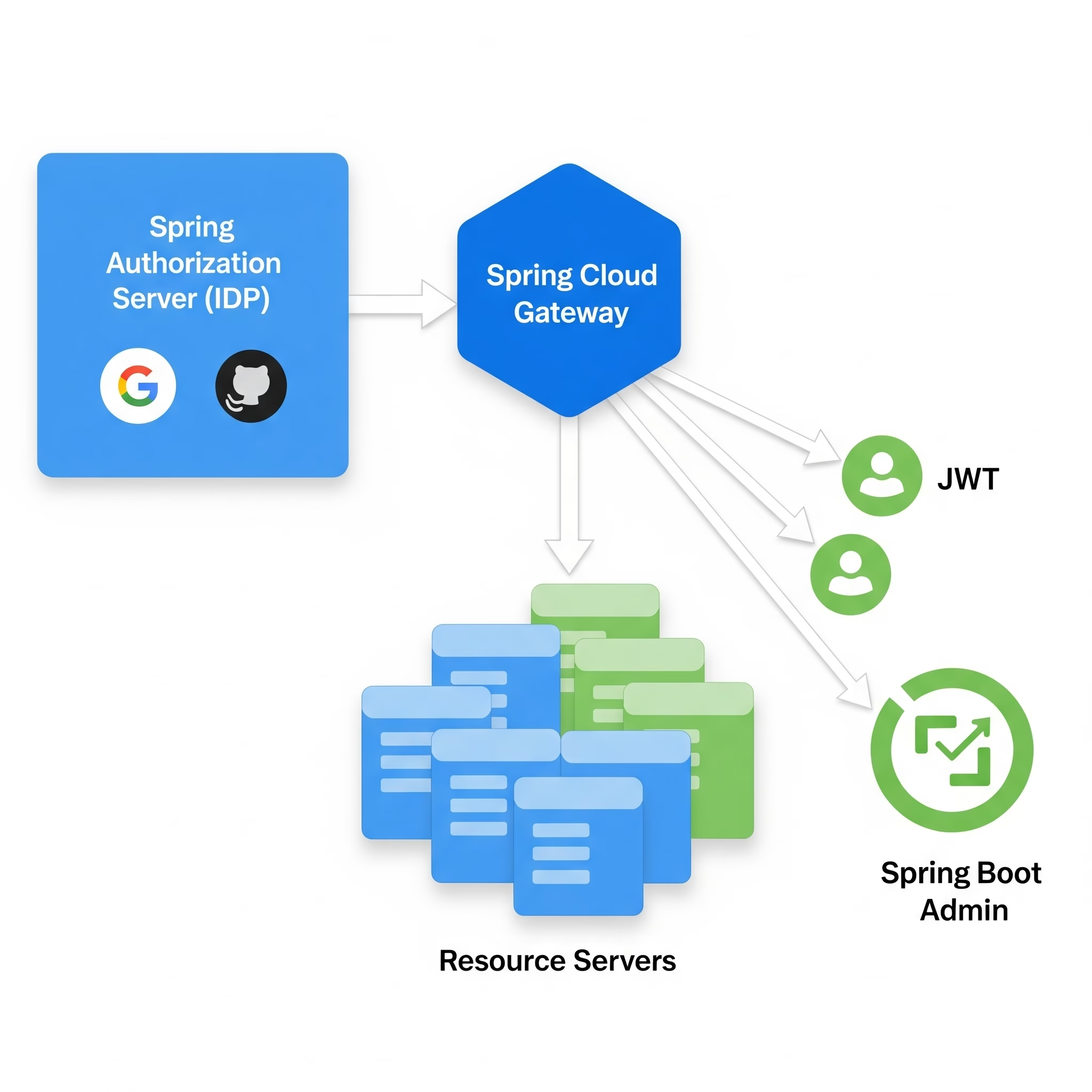
As a Software Architect, transitioning from the legacy spring-security-oauth2 to the modern Spring Authorization Server (SAS) is a critical shift. This guide provides a deep dive into building a robust identity platform integrated with Spring Cloud Gateway and Social Logins.
1. Core Architecture: How it Works
Spring Authorization Server is the official successor to the legacy OAuth stack. It is built as a standalone library (not a separate product like Keycloak) that you embed in a Spring Boot application.
The OAuth 2.1 / OIDC 1.0 Flow
- Client Authentication: The client (e.g., Spring Cloud Gateway) redirects the user to the SAS
/oauth2/authorizeendpoint. - User Authentication: SAS authenticates the user (via Form Login or Federated Social Login).
- Consent: The user grants permission to the client.
- Token Issuance: SAS issues a JWT (Access Token) and an optional Refresh Token.
2. Setting Up the Authorization Server (Gradle)
In your build.gradle, include the specialized starter:
dependencies {
    implementation 'org.springframework.boot:spring-boot-starter-oauth2-authorization-server'
    implementation 'org.springframework.boot:spring-boot-starter-oauth2-client' // For Social Login
    implementation 'org.springframework.boot:spring-boot-starter-web'
}
The Configuration Bean
SAS requires several beans to define its behavior. The most important is the RegisteredClientRepository.
@Configuration
public class AuthorizationServerConfig {

    @Bean
    @Order(1)
    public SecurityFilterChain authServerSecurityFilterChain(HttpSecurity http) throws Exception {
        OAuth2AuthorizationServerConfiguration.applyDefaultSecurity(http);
        http.getConfigurer(OAuth2AuthorizationServerConfigurer.class)
            .oidc(Customizer.withDefaults());	// Enable OpenID Connect 1.0

        http.exceptionHandling((exceptions) -> exceptions
            .defaultAuthenticationEntryPointFor(
                new LoginUrlAuthenticationEntryPoint("/login"),
                new MediaTypeRequestMatcher(MediaType.TEXT_HTML)
            )
        );
        return http.build();
    }

    @Bean
    public RegisteredClientRepository registeredClientRepository() {
        RegisteredClient gatewayClient = RegisteredClient.withId(UUID.randomUUID().toString())
                .clientId("gateway-client")
                .clientSecret("{noop}secret")
                .clientAuthenticationMethod(ClientAuthenticationMethod.CLIENT_SECRET_BASIC)
                .authorizationGrantType(AuthorizationGrantType.AUTHORIZATION_CODE)
                .authorizationGrantType(AuthorizationGrantType.REFRESH_TOKEN)
                .redirectUri("[http://127.0.0.1:8080/login/oauth2/code/gateway](http://127.0.0.1:8080/login/oauth2/code/gateway)")
                .scope(OidcScopes.OPENID)
                .scope(OidcScopes.PROFILE)
                .scope("resource.read")
                .build();

        return new InMemoryRegisteredClientRepository(gatewayClient);
    }
}
3. Role Integration & JWT Customization
In an OAuth2 ecosystem, roles are typically passed as “claims” inside the JWT. By default, SAS doesn’t include user roles in the access token. You must customize the OAuth2TokenCustomizer.
Customizing the JWT on the Auth Server
This logic runs on the Authorization Server to fetch roles from your UserDetailsService and inject them into the token.
@Bean
public OAuth2TokenCustomizer<JwtEncodingContext> tokenCustomizer() {
    return (context) -> {
        if (OAuth2TokenType.ACCESS_TOKEN.equals(context.getTokenType())) {
            Authentication principal = context.getPrincipal();
            Set<String> authorities = principal.getAuthorities().stream()
                    .map(GrantedAuthority::getAuthority)
                    .collect(Collectors.toSet());

            // Add custom "roles" claim to the JWT
            context.getClaims().claim("roles", authorities);
        }
    };
}
Mapping Roles on the Resource Server (Microservices)
Microservices need to know that the roles claim in the JWT should be treated as Spring Security authorities (prefixed with ROLE_).
@Configuration
@EnableMethodSecurity // Enables @PreAuthorize
public class ResourceServerConfig {

    @Bean
    public JwtAuthenticationConverter jwtAuthenticationConverter() {
        JwtGrantedAuthoritiesConverter grantedAuthoritiesConverter = new JwtGrantedAuthoritiesConverter();
        grantedAuthoritiesConverter.setAuthorityPrefix("ROLE_"); // Convert 'ADMIN' to 'ROLE_ADMIN'
        grantedAuthoritiesConverter.setAuthoritiesClaimName("roles"); // Look for 'roles' claim

        JwtAuthenticationConverter jwtAuthenticationConverter = new JwtAuthenticationConverter();
        jwtAuthenticationConverter.setJwtGrantedAuthoritiesConverter(grantedAuthoritiesConverter);
        return jwtAuthenticationConverter;
    }

    @Bean
    public SecurityFilterChain securityFilterChain(HttpSecurity http) throws Exception {
        http
            .authorizeHttpRequests(auth -> auth.anyRequest().authenticated())
            .oauth2ResourceServer(oauth2 -> oauth2
                .jwt(jwt -> jwt.jwtAuthenticationConverter(jwtAuthenticationConverter()))
            );
        return http.build();
    }
}
4. Social Login & Federated Identity
To allow users to login via Google or GitHub, SAS acts as an OAuth2 Client to those providers while remaining the Authorization Server for your internal microservices.
Configuration (application.yml)
spring:
  security:
    oauth2:
      client:
        registration:
          google:
            client-id: ${GOOGLE_CLIENT_ID}
            client-secret: ${GOOGLE_CLIENT_SECRET}
            scope: openid, profile, email
Enabling Federated Login
In your “Default” Security Filter Chain, swap formLogin() for oauth2Login():
@Bean
@Order(2)
public SecurityFilterChain defaultSecurityFilterChain(HttpSecurity http) throws Exception {
    http
        .authorizeHttpRequests((authorize) -> authorize
            .anyRequest().authenticated()
        )
        .oauth2Login(Customizer.withDefaults());

    return http.build();
}
5. Integration with Spring Cloud Gateway
The Gateway should act as the OAuth2 Client. It handles the login flow and then relays the JWT to downstream microservices.
Gateway Dependencies (build.gradle)
dependencies {
    implementation 'org.springframework.cloud:spring-cloud-starter-gateway'
    implementation 'org.springframework.boot:spring-boot-starter-oauth2-client'
}
Token Relay Pattern
The TokenRelay filter automatically extracts the Access Token from the session and adds it as a Authorization: Bearer <token> header to downstream requests.
spring:
  cloud:
    gateway:
      routes:
        - id: user-service
          uri: lb://user-service
          predicates:
            - Path=/api/users/**
          filters:
            - TokenRelay=

  security:
    oauth2:
      client:
        provider:
          spring-auth-server:
            issuer-uri: http://auth-server:9000
        registration:
          gateway:
            provider: spring-auth-server
            client-id: gateway-client
            client-secret: secret
            authorization-grant-type: authorization_code
            scope: openid, profile, resource.read
6. Securing Spring Boot Admin Server
Securing the Admin Server involves protecting its UI and its communication with client instances.
Admin Server as OAuth2 Client (build.gradle)
dependencies {
    implementation 'de.codecentric:spring-boot-admin-server'
    implementation 'de.codecentric:spring-boot-admin-server-ui'
    implementation 'org.springframework.boot:spring-boot-starter-oauth2-client'
}
Security Filter Chain
@Configuration
public class AdminSecurityConfig {
    private final AdminServerProperties adminServer;

    public AdminSecurityConfig(AdminServerProperties adminServer) {
        this.adminServer = adminServer;
    }

    @Bean
    public SecurityFilterChain filterChain(HttpSecurity http) throws Exception {
        SavedRequestAwareAuthenticationSuccessHandler successHandler =
            new SavedRequestAwareAuthenticationSuccessHandler();
        successHandler.setTargetUrlParameter("redirectTo");
        successHandler.setDefaultTargetUrl(this.adminServer.getContextPath() + "/");

        http.authorizeHttpRequests(authorize -> authorize
                .requestMatchers(this.adminServer.getContextPath() + "/assets/**").permitAll()
                .requestMatchers(this.adminServer.getContextPath() + "/login").permitAll()
                .anyRequest().authenticated()
            )
            .oauth2Login(oauth2 -> oauth2
                .loginPage(this.adminServer.getContextPath() + "/login")
                .successHandler(successHandler)
            )
            .csrf(csrf -> csrf.disable());

        return http.build();
    }
}
7. Securing Downstream Microservices (Resource Servers)
Microservices behind the gateway only need to trust the Spring Authorization Server.
Security Configuration with Method Security
@RestController
@RequestMapping("/api/orders")
public class OrderController {

    @GetMapping("/{id}")
    @PreAuthorize("hasRole('USER')") // Role-based security at the method level
    public Order getOrder(@PathVariable String id) {
        return orderService.findById(id);
    }

    @DeleteMapping("/{id}")
    @PreAuthorize("hasRole('ADMIN')")
    public void deleteOrder(@PathVariable String id) {
        orderService.delete(id);
    }
}
Summary for Architects
| Component | Role | Role Management |
| Auth Server | IDP | Fetches roles from DB and embeds them in JWT via OAuth2TokenCustomizer. |
| Gateway | Client | Agnostic of internal roles; simply relays the token. |
| Resource Server | API | Converts JWT roles claim to GrantedAuthorities and enforces via @PreAuthorize. |
By centralizing role mapping in the OAuth2TokenCustomizer, you ensure that all microservices receive a consistent security context regardless of the authentication source (Social vs. Form Login).
Share this:

Discover more from GhostProgrammer - Jeff Miller
Subscribe to get the latest posts sent to your email.